
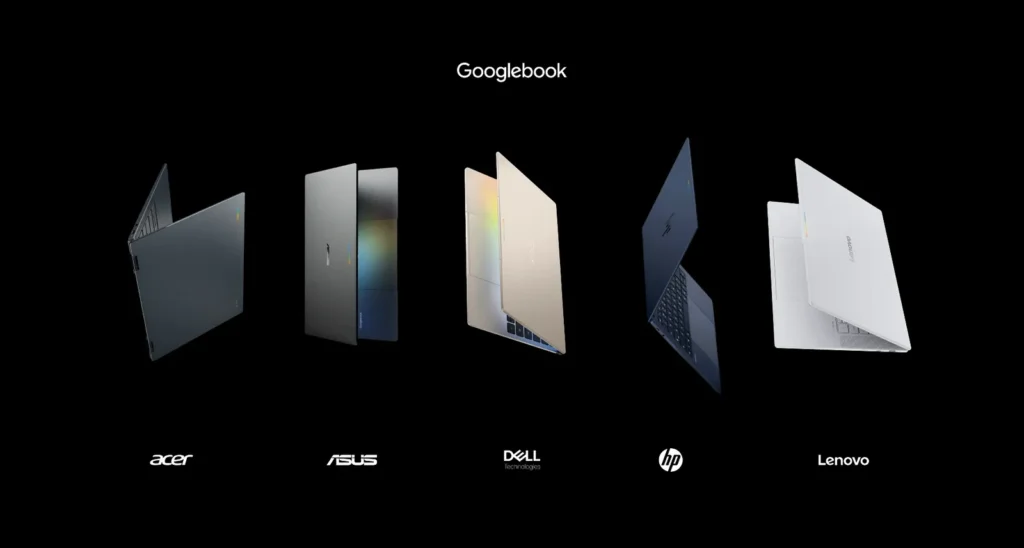
Googlebook laptops with Gemini AI and Android apps
Googlebook laptops bring Gemini AI and Android app support to Windows alternatives with major OEMs launching pre-orders across select markets now.
Googlebook Android laptops
What Are Googlebook Laptops and Why They Matter
Google has quietly transformed the laptop landscape by partnering with major manufacturers to create something genuinely different. Googlebook represents a collaborative effort between Google and industry leaders like HP, Dell, Asus, Acer, and Lenovo to bring a new category of device to market. Rather than being traditional Windows machines, these laptops run on Google’s ecosystem while maintaining compatibility with Android applications.
The timing couldn’t be more strategic. As users increasingly rely on mobile apps and cloud services, the gap between smartphone and desktop experiences has become painfully obvious. Googlebook laptops aim to bridge that gap by natively supporting Android applications directly on laptop hardware, something that hasn’t been widely available in mainstream consumer products until now.
Gemini AI Integration: The Brain Behind Googlebook
At the heart of these new devices sits Gemini, Google’s advanced artificial intelligence system. Rather than treating AI as an afterthought, Googlebook laptops integrate Gemini throughout the entire user experience. This means the assistant can understand context across your open applications, help with creative tasks, and provide real-time support without requiring you to switch between windows or search browsers.
Gemini’s presence on Googlebook laptops isn’t limited to a chatbot interface. The AI handles productivity features like intelligent document summarization, advanced search capabilities across local files and cloud storage, and contextual suggestions based on what you’re actually working on. If you’re writing an email, Gemini can suggest completions and refinements. If you’re analyzing data, it can help identify patterns and anomalies.
The implementation allows Gemini to work offline for certain tasks while maintaining cloud connectivity for more complex operations. This hybrid approach means you’re not completely dependent on internet speed for basic productivity, yet you can leverage Google’s powerful servers when you need advanced capabilities.
Android App Support: Running Your Phone Apps on Your Laptop
Perhaps the most compelling feature of Googlebook laptops is native Android application support. This changes everything about how you might approach laptop productivity. Instead of being confined to web-based versions of apps or searching for desktop alternatives, you run the exact same applications you use on your phone.
This creates genuine productivity benefits. Photo editing apps designed for touch input can now use a trackpad and keyboard. Social media management tools function exactly as they do on mobile. Specialized applications from niche industries—whether that’s architecture, medical diagnosis, or creative design—work seamlessly without requiring separate desktop versions or workarounds.
The Android app ecosystem is vast, with millions of applications spanning every conceivable use case. Games, productivity suites, communication tools, design applications, and specialized professional software all become available on your Googlebook laptop. The seamless integration means you’re not running apps through an emulator or compatibility layer; they’re native to the platform.
Which Manufacturers Are Offering Googlebook Laptops
Five major hardware manufacturers have committed to the Googlebook platform: HP, Dell, Asus, Acer, and Lenovo. These aren’t niche players—they represent the backbone of the global laptop market. Having this breadth of manufacturer support signals serious momentum for the platform and suggests Googlebook devices will be available across multiple price points and design philosophies.
Each manufacturer brings its own design language and hardware specialization. HP brings its premium materials and attention to industrial design. Dell contributes expertise from its enterprise and consumer segments. Asus adds gaming-focused features and cutting-edge thermal management. Acer brings value-oriented options. Lenovo leverages its massive global distribution network. This diversity means you won’t be locked into a single device type or aesthetic.
The competition between manufacturers should drive innovation quickly. Each wants to differentiate, meaning you’ll likely see rapid improvements in battery life, display technology, processor performance, and form factor innovations specifically optimized for Android app usage.
Pre-Orders and Availability Timeline
Pre-orders for Googlebook laptops are currently open in the United States and select international markets. The rollout strategy suggests a measured approach to ensure availability and quality across regions. However, India’s market availability hasn’t been confirmed yet, despite being a massive consumer technology market with significant growth potential.
The pre-order phase is crucial because it provides early adopters the opportunity to secure devices while manufacturers gauge demand. If you’re interested in experiencing Googlebook technology early, monitoring the official channels for your preferred manufacturer is essential. Pre-order periods often include special pricing or bundled accessories that aren’t available after general release.
The fact that multiple manufacturers are launching simultaneously suggests coordinated marketing and a genuine ecosystem launch rather than a single company’s experiment. This coordinated approach typically results in better software optimization, faster app developer adoption, and a healthier platform overall.
Practical Considerations Before You Pre-Order
Before jumping into a Googlebook pre-order, consider your actual use case. These devices excel for users who are deeply embedded in Google’s ecosystem—Gmail, Google Drive, Google Docs, and other cloud-based productivity tools. If you rely heavily on specialized desktop software that doesn’t have an Android equivalent, you might find limitations.
Battery life and thermal management are worth investigating for each manufacturer’s implementation. Android apps can be demanding, and integrating AI features like Gemini requires substantial processing power. Look at actual battery runtime claims and thermal specifications before committing to a particular model.
The trackpad and keyboard experience becomes critical when running apps designed for touch. Check reviews specifically addressing how well these hardware interfaces work with Android applications, since this will significantly impact your daily experience.
Common Questions About Googlebook Laptops
Can you install traditional desktop software on Googlebook laptops? Googlebook laptops are designed around Android and Google’s ecosystem. Traditional Windows or Linux software won’t run natively, though web-based alternatives and Android equivalents can handle most workflows.
Do you need an internet connection to use Googlebook laptops? These devices work offline for many tasks, though features relying on Gemini AI or cloud services will require connectivity. Local storage and offline-capable Android apps ensure productivity even without internet access.
Will Googlebook be available in my region? Currently, pre-orders are available in the US and select markets, with India availability still unconfirmed. Check your local retailer or manufacturer websites for region-specific availability and timeline announcements.
What to Watch For Next
Keep an eye on developer response to this platform. The success of Googlebook depends on app creators optimizing their Android applications for larger screens and different input methods. As the platform matures, expect to see dedicated apps built specifically for the laptop form factor rather than simple mobile app ports.
Monitor early reviews once devices ship, focusing on real-world battery life, thermal performance, and how well Gemini integration actually improves productivity in practice. These concrete experiences will matter more than marketing claims when deciding whether a Googlebook laptop fits your needs.


